

AI chatbots have become part of everyday work. But these conversations can contain more sensitive information than users realize. A prompt might include a customer’s name, an email address, a phone number, a home address, financial details, or confidential business information. Once this information is sent to an external AI service, users may have limited visibility into how it is processed, retained, or governed.
So, how can you benefit from AI without unnecessarily exposing your personal information?
The answer starts with data minimization: give AI the information it needs to complete a task without exposing sensitive details it does not need.
In this guide, we explain the main AI privacy risks, practical ways to protect sensitive information, and how AgentCloak Desktop helps you use popular AI chatbots while keeping your real private data out of the prompts they receive.
Why is data privacy important when using AI chatbots?
AI assistants can make everyday tasks easier, but using them often involves sharing information with third-party services.
Consider a few common examples:
- A sales professional asks AI to summarize a customer conversation containing names, email addresses, and phone numbers.
- An employee uses an AI assistant to rewrite a document containing confidential company information.
- A developer asks AI to troubleshoot a problem using logs that include credentials or customer identifiers.
- An individual asks an AI chatbot to help write a letter containing their home address or financial details.
In each case, the AI may need the surrounding context to provide a useful answer. However, it usually does not need every real name, address, or account number in the original prompt.
The challenge is that removing sensitive information manually takes time, especially when prompts are long or contain multiple personal details.
Without an effective privacy workflow, users may unintentionally expose information that should remain confidential.
What types of data should you avoid sharing with AI?
Before entering information into an AI chatbot, consider whether the prompt contains data that could identify a person, expose an account, or reveal confidential business information.
Common examples include:
Personally identifiable information (PII)
- Full names and personal contact details
- Email addresses and phone numbers
- Home and business addresses
- Government-issued identification and tax numbers
Financial information
- Bank account and routing numbers
- Payment information
- Financial records containing personal identifiers
Confidential business information
- Customer records and internal communications
- Proprietary documents and commercial agreements
- Internal system logs containing sensitive identifiers
- Information subject to contractual or regulatory restrictions
Not every AI task requires these details. In many cases, a synthetic substitute or a generalized description is enough for the model to understand the request.
For example, an AI assistant can help draft a customer email without receiving the customer’s actual name or email address.
The goal is not to stop using AI. It is to reduce unnecessary exposure while preserving the context needed to get a useful response.
7 practical ways to protect your data when using AI Chatbots
1. Review your prompts before sending them
Make it a habit to check prompts for personal information, credentials, and confidential details before submitting them.
Remove unnecessary identifiers and replace real names with generic labels when possible.
For example, instead of asking an AI chatbot to analyze a conversation using a customer’s full name and email address, use a placeholder such as Customer A.
This simple habit reduces exposure, although it can become difficult to maintain when working with large documents or complex prompts.
2. Avoid sharing passwords, API Keys, and authentication secrets
Never include passwords, private keys, access tokens, or other authentication secrets in ordinary AI prompts.
If you need help debugging a technical issue, replace credentials with dummy values and remove sensitive information from logs.
Remember that masking a secret in one part of a prompt is not enough if the same value appears elsewhere in the conversation.
3. Understand your AI provider’s privacy settings
Review the privacy, retention, and data-use settings of the AI tools you use.
Depending on the provider and account type, settings may affect whether conversations are used to improve models, how long information is retained, and who can access the data.
Enterprise plans may offer additional administrative controls, but the exact protections depend on the service and configuration.
Privacy settings are important, but they do not eliminate the need to minimize sensitive information before sending it to an AI service.
4. Use synthetic data instead of real personal information
Synthetic data replaces real values with artificial substitutes while preserving the context needed for a task.
For example, you could replace:
- Peter Parker with Julio Schmidt
- A real street address with a synthetic address
- An actual account number with a substitute value
An AI chatbot can then work with the modified prompt without receiving the original identifying values.
However, simple find-and-replace techniques can be unreliable. A document may contain the same person in several places, or sensitive information may appear in an unexpected format.
A more robust approach uses consistent mappings between original values and their substitutes, allowing the original values to be restored in the response when appropriate.
5. Choose tools that protect data before it reaches AI
One of the most important privacy controls is protecting information before it leaves your device.
Rather than relying exclusively on the AI provider’s policies after data has been submitted, you can introduce a data protection layer that detects sensitive information and replaces it before transmission.
This approach is particularly useful when you want to keep using familiar AI chatbots without manually rewriting every prompt.
AgentCloak Desktop is designed for this purpose. It detects supported types of sensitive information and replaces them with synthetic substitutes on your device before the protected prompt is sent to the AI.
6. Use only the information necessary for the task
Data minimization means sharing only the information required to complete a particular task.
For example, if you ask an AI assistant to categorize customer feedback, it may need the feedback text but not the customer’s full name, home address, or account number.
Reducing unnecessary data can lower privacy risks while preserving the information needed to generate a useful response.
For more details, read InCountry’s guide to why data minimization is critical for secure and compliant AI systems.
7. Establish clear rules for workplace AI use
Organizations should define which information employees may submit to AI services, which tools are approved, and how sensitive data must be handled.
Useful measures include employee training, approved AI tool lists, data classification policies, and technical controls that reduce accidental disclosure.
Where AI is used with regulated or confidential information, organizations should also consider their contractual obligations, applicable data protection laws, and requirements governing cross-border data transfers.
Individual privacy tools can help reduce exposure, but organizations may need centrally managed controls, auditing, and broader integrations to protect enterprise workflows.
How AgentCloak Desktop protects your data when using AI
AgentCloak Desktop offers a practical way to add data protection to everyday AI conversations.
Instead of asking users to stop using their preferred AI tools, AgentCloak Desktop helps them continue using supported chatbots while keeping real private values out of the prompts sent to those services.
Step 1: Detect sensitive information
AgentCloak Desktop uses a compact AI model that runs on your computer, alongside deterministic rules, to identify supported sensitive values.
These include names, email addresses, phone numbers, URLs, government identification and tax numbers, bank account details, and addresses.
Step 2: Replace real values with synthetic substitutes
Before the prompt is sent to the AI chatbot, AgentCloak Desktop replaces detected values with synthetic alternatives.
For example:
Original prompt:
“Draft a follow-up email to Peter Parker at peter@example.com about his appointment at 364 23rd St.”
Protected prompt:
“Draft a follow-up email to Julio Schmidt at a synthetic email address about his appointment at 401 Vanessa Curve.”
The AI receives the protected version rather than the original personal details.

Step 3: Let the AI complete the task
The chatbot processes the prompt using the available context and generates a response.
Because the identifying values have been replaced, the model can work on the task without receiving those original values.
Step 4: Restore original values in the response
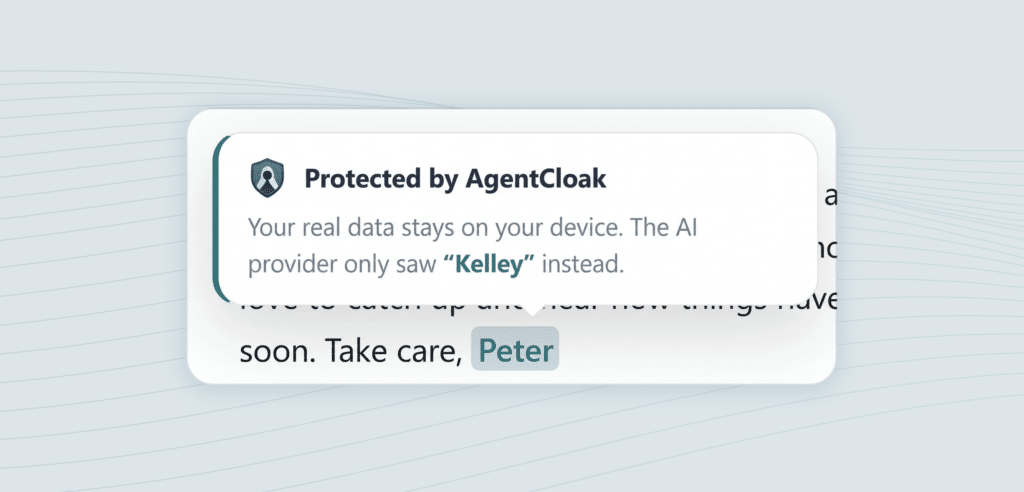
AgentCloak Desktop uses its personal digital twin, the mapping between real values and their synthetic substitutes, to restore the original values in the response on your side.
This allows the resulting text to remain useful without requiring the AI chatbot to receive the original identifiers.
The digital twin mappings are stored on your computer and are not sent to the AI service.
The result: You can use AI assistance while reducing the amount of personal information exposed to the chatbot.
Is AgentCloak Desktop suitable for enterprise AI security?
AgentCloak Desktop is designed for individual use. It can also be a useful starting point for employees who want to reduce accidental exposure of personal information when using AI.
Organizations with broader security and compliance requirements may need additional capabilities, including centralized policy management, audit logs, enterprise deployment, more extensive language support, and protection for integrated applications and AI agents.
For these scenarios, InCountry offers AgentCloak Server, which extends data cloaking with enterprise-oriented controls and integration options.
The right approach depends on the organization’s data sensitivity, AI architecture, regulatory obligations, and governance requirements.
Frequently asked questions
How can I use ChatGPT without sharing personal information?
You can remove identifying information manually, use synthetic examples, and review your provider’s privacy settings. A data-cloaking tool such as AgentCloak Desktop can automate the replacement of supported sensitive values before prompts reach the AI service.
Does AgentCloak Desktop send my real private data to the AI chatbot?
AgentCloak Desktop is designed to replace detected, supported private values with synthetic substitutes before sending prompts to the AI. The original values are restored in the response on your side using your local digital twin mappings.
Is AgentCloak Desktop free?
Yes. AgentCloak Desktop is available free for individual use as a browser extension or desktop application, subject to supported platforms and features.
Does data cloaking affect AI response quality?
Cloaking is designed to preserve enough context for the AI to complete the requested task. Results can depend on the prompt and the type of information being replaced, so users should review the output for accuracy and completeness.
Is data cloaking the same as anonymization?
Not necessarily. Data cloaking replaces real values with synthetic substitutes while maintaining a mapping that can restore the original values. Because the mapping exists, cloaking should not automatically be treated as irreversible anonymization.
Can businesses use AgentCloak to protect sensitive data across AI workflows?
Yes. AgentCloak offers enterprise capabilities through AgentCloak Server, including broader data protection, integrations, and centralized management options. Organizations should evaluate the appropriate deployment against their security and compliance requirements.
Use AI without unnecessarily exposing your private data
AI chatbots can be valuable productivity tools, but using them responsibly requires more than writing better prompts. It also requires controlling which information reaches the model.
Reviewing prompts, avoiding credentials, applying data minimization, and choosing tools that protect information before transmission can all reduce unnecessary exposure.
AgentCloak Desktop makes this approach more practical by automatically replacing supported private values with synthetic substitutes before they reach compatible AI chatbots, then restoring original values in the response on your device.
Don’t expose your data to AI. Cloak it first.
Get AgentCloak Desktop for free and add a layer of data protection to your everyday AI conversations.


